Tried removing and re-adding them to Plex with no luck.
As the metadata for all the items are stored in a sqlite3 database the following procedure were used to correct the instances.
Steps to follow:
- Find the item you want to edit
- Find the database to edit
- Exit Plex and update the database file.
Item you want to edit:
Select the movie or episode in question and select "..." > "Info" or "Get Info" > "View XML" Bottom left of the window.The property "ratingKey" is the id you need to update in the database.
Note: The date/time is stored in Unix Time in the XML output.
Database location:
On Windows install a SQLite editor e.g. SqliteBrowserThe database is located at
%LOCALAPPDATA%\Plex Media Server\Plug-in Support\Databases\com.plexapp.plugins.library.db
by default or can be found from the web interface: Settings > Server > General > "
Open the database and select the "metadata_items" table.
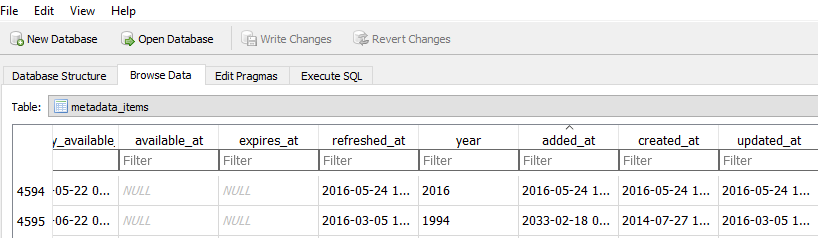
Browse or search for the id with the value of ratingKey.
Update the time to the correct date/time, easiest would be to make the added_at value same as the created_at value.
Write/Save the changes back to the sqlite3 database and restart plex.
Command line:
This can be done from the command line as well with a command like:
UPDATE metadata_items SET added_at = created_at WHERE id=[value of ratingKey]